

Have you ever checked your phone and wondered, “Where did all my mobile data go?”
From scrolling through social media to streaming videos and using navigation apps, everyday activities can consume more data than you might expect. Even apps running in the background can use data without you noticing.
The good news? You don’t need to give up your favourite apps to save data. A few simple changes can help you reduce mobile data usage and make your data last longer.
Why Is My Mobile Data Running Out So Fast?
Your phone uses mobile data for more than just browsing the internet. Some everyday activities can consume data without you realizing it.
Here are some common reasons:
- Background apps: Apps can refresh content even when you’re not using them.
- Automatic updates: Your phone may download updates using mobile data.
- Video streaming: Watching videos in HD or 4K can use significant amounts of data.
- Cloud backups: Uploading photos and videos automatically can increase data consumption.
- Personal hotspots: Sharing your connection with other devices can use up your data faster.
Fortunately, most of these activities can be managed through your phone’s settings.
5 Simple Tips to Reduce Mobile Data Usage
Small changes to your phone settings and daily habits can make a big difference. Here are five easy ways to save mobile data.
1. Limit Background Data Usage
Some apps continue refreshing content and using mobile data even when you’re not actively using them.
What can you do?
- iPhone: Go to Settings > General > Background App Refresh and disable it for apps that don’t need constant updates.
- Android: Go to Settings > Apps, select an app, and look for its background mobile data settings.
- Disable automatic app updates over mobile data when possible.
Quick Tip: Start with apps you rarely use but that consume a lot of background data.
2. Download Your Favourite Content Before Leaving Wi-Fi
Streaming music, videos, and podcasts can quickly add up, especially when you’re away from Wi-Fi.
What can you do?
- Download playlists and podcasts while connected to Wi-Fi.
- Save movies and shows for offline viewing when available.
- Lower video quality when streaming over mobile data.
Quick Tip: Download your favourite content before your commute or a long trip to enjoy it without using mobile data.
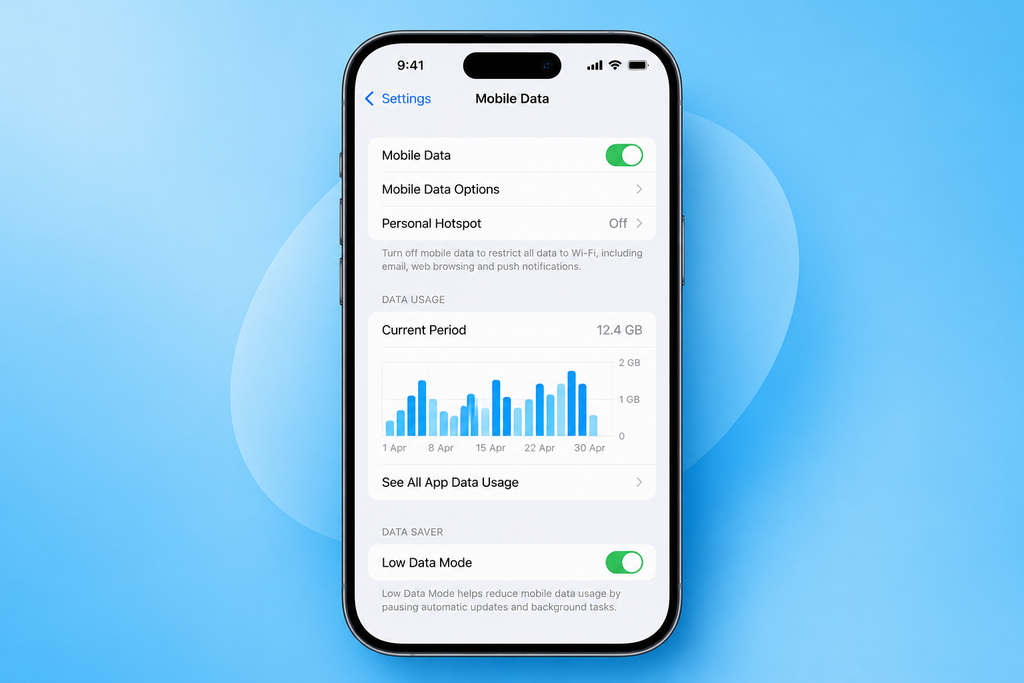
3. Turn On Data Saver Mode
Most smartphones have built-in features that help reduce unnecessary mobile data consumption by limiting background activity.
How to activate it:
- iPhone: Go to Settings > Cellular > Cellular Data Options and look for Low Data Mode.
- Android: Go to Settings > Network & Internet > Data Saver.
The exact steps may vary depending on your device.
Enabling this feature can be especially helpful when you’re approaching your monthly data limit.
4. Adjust Your Social Media Settings
Apps like Instagram, TikTok, Facebook, and YouTube can consume significant amounts of mobile data, particularly when videos play automatically.
What can you do?
- Disable video autoplay where available.
- Enable data-saving options within your apps.
- Reduce video quality when using mobile data.
- Upload large photos and videos while connected to Wi-Fi.
Even small adjustments can help reduce data consumption throughout the day.
5. Keep Track of Your Mobile Data Usage
Knowing how much data you use is one of the easiest ways to avoid running out unexpectedly.
What can you do?
- Check your data usage in your phone settings.
- Identify which apps consume the most data.
- Set data usage warnings on supported devices.
- Monitor your usage throughout your billing cycle.
If you’re a PhoneBox customer, you can also check your remaining data directly through the PhoneBox app or My Account.
PhoneBox sends sms notifications when you reach your data limit, helping you stay informed about your usage.
Quick Tip: Check your PhoneBox account regularly rather than waiting until you’ve reached your limit.
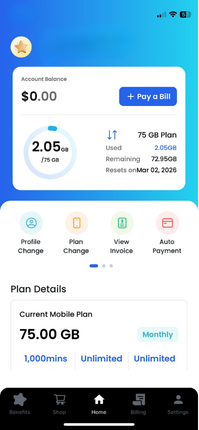
*Data Usage PhoneBox App
How Much Mobile Data Do You Actually Need?
The amount of mobile data you need depends on how you use your phone every day.
- Light users: Mainly messaging, emails, and occasional web browsing.
- Moderate users: Regular social media, music streaming, and navigation.
- Heavy users: Frequent video streaming, video calls, hotspot usage, and large downloads.
Understanding your data habits can help you choose a PhoneBox plan that matches your needs, so you can stay connected without constantly worrying about running out of data.
Not sure which plan is right for you? Explore our mobile plans and find the one that best fits your lifestyle.